Login
Your link will open in a new tab
If this has not happened, please click here

As HR and Health & Safety professionals, we noticed a significant gap in the market, and more importantly employer’s knowledge of effective business administration and regulations, plus the need for businesses to digitalise the HR and Health & Safety management process.
 oneHR
oneHRRemove the HR management headache
oneSAFEMake Health & Safety compliance seamless
oneHR oneSAFE oneHR Back oneSAFE Back test BackIf this has not happened, please click here

On oneHR there are three types of access levels:
Admin – The admin can oversee all employees and update their information, leave allowance etc. The admin can also customise the system, set tasks and reminders and run reports across the business.
Manager – A manager can oversee particular people within their department. They are able to update basic bits of information for people within their team, upload their documents and accept/ decline their team members’ absence and leave requests.
Employee – Employees are only able to access information that is relevant to them and book holidays for themselves.
When setting up an employee, under the ‘create user’ tab, you will have the ability to select their user role.
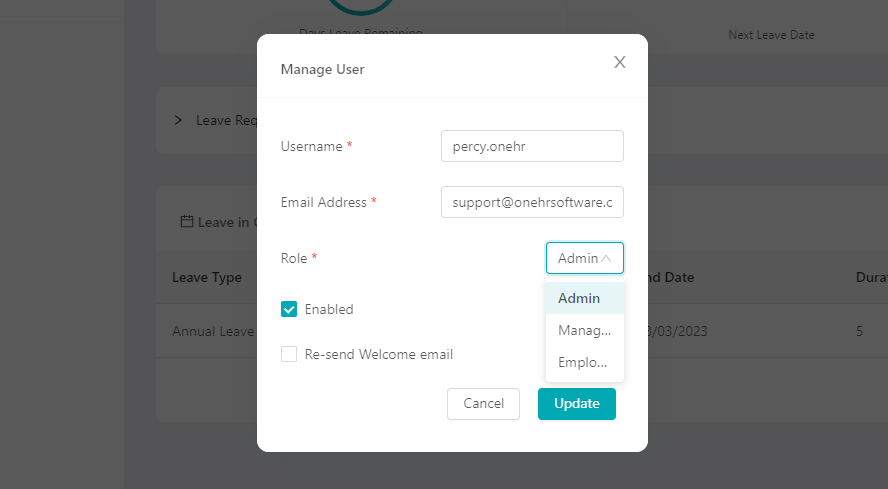
This can also be changed at any time, by once again navigating to the employee’s profile and updating it under the ‘edit user’ option.

May 15, 2023
AutoHR allows you to set and automate reminders for key HR processes within your business. To get started, we are...
Read more about AutoHR
May 15, 2023
To add a new Department on oneHR, start by clicking on the Admin option from the main left-hand side menu....
Read more about Setting up Departments
May 12, 2023
If for any reason you want to re-instate a user that has been archived. You can start this process by...
Read more about Re-adding an Archived User
February 23, 2023
To change the leave period on oneHR, start by clicking on the Admin option from the main left-hand side menu....
Read more about Setting up the Leave Period