Login
Your link will open in a new tab
If this has not happened, please click here

As HR and Health & Safety professionals, we noticed a significant gap in the market, and more importantly employer’s knowledge of effective business administration and regulations, plus the need for businesses to digitalise the HR and Health & Safety management process.
 oneHR
oneHRRemove the HR management headache
oneSAFEMake Health & Safety compliance seamless
oneHR oneSAFE oneHR Back oneSAFE Back test BackIf this has not happened, please click here

If for any reason you want to re-instate a user that has been archived. You can start this process by heading into the Admin section from the main oneHR menu.
From here, click into the Employee Management tab from the sub-menu.

Here you can select to view former employees via the drop down menu in the top left hand side of this selection.
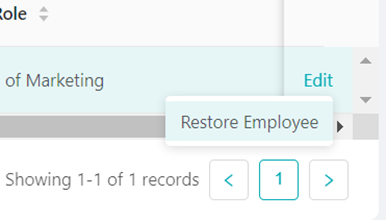
Once you have your list of former employees, you can click on the ‘edit’ option for the selected user and you will be presented with the option to restore this user.

February 23, 2023
To change the leave period on oneHR, start by clicking on the Admin option from the main left-hand side menu....
Read more about Setting up the Leave Period
May 15, 2023
AutoHR allows you to set and automate reminders for key HR processes within your business. To get started, we are...
Read more about AutoHR
May 15, 2023
To add a new Employee Custom Field on oneHR, start by clicking on the Admin option from the main left-hand...
Read more about Creating a Custom Field
May 15, 2023
This is a guide for Admins and Managers who are looking to add leave and/or absence for their employees. Updated...
Read more about Adding Leave and Absence